
7.5 KiB
Creating a tournament
About
Sendou.ink can used to run Splatoon 3 tournaments without the need of another bracket hosting website. Currently it is in limited beta. Note that you should only make tournaments you host yourself. Creating tournaments on behalf of others is not allowed. Access is available to two groups:
- Patreon supporters of Supporter tier or above
- Established organizations
See the /faq page for more information about established organizations.
Creating
Tournaments can be created via the add menu on the top right of your screen after logging in assuming you have access:
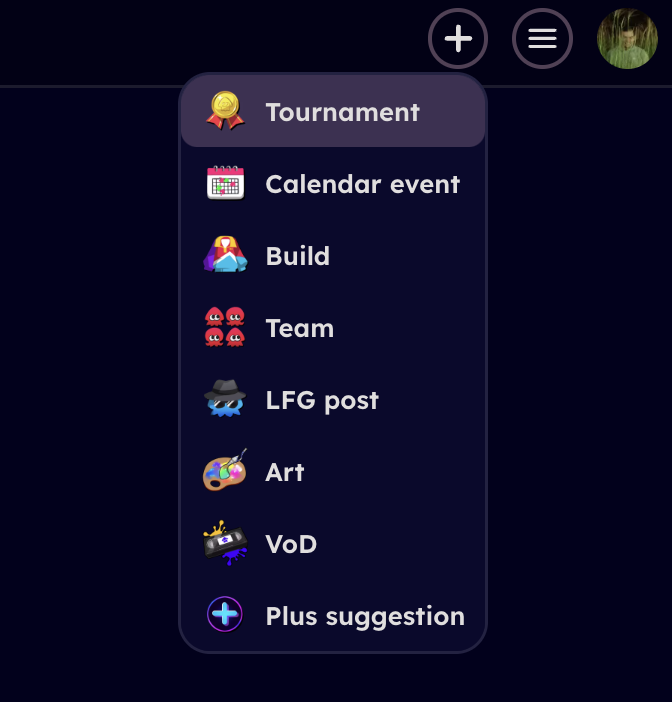
Fields
This section explains all the different options when you are creating a tournament and what they do.
Name
Name of the tournament.
Description
Description of the tournament, shown when registering. Supports Markdown including embedding images.
Organization
Which organization to host the tournament under. Note that if you do not have global tournament adder permissions (patron perk) you can only host tournaments for organizations that are "established". To host a tournament for such an organization you need either the Admin or Organizer role.
Rules
Rules of the tournament. Supports Markdown including embedding images.
Dates
When tournament starts. Note that unlike calendar events, tournaments can only have one actual starting time.
Discord server invite URL
Invite link URL to your tournament's Discord server.
Tags
Tags that apply to your tournament. Please take a look at the selection and choose all that apply.
Logo
Tournament logo you can upload to be shown in various places.
Players count
Choose whether you want to host a regular 4v4 tournmament or 3v3/2v2/1v1 tournament.
Registration closes at
Choose relative to the tournament start time when sign ups close. When the registration closes new teams can't sign up, add team members, change their registration info and new users can't join the list of subs. Everything but the last is possible via admin actions regardless of whether the registration is open or not.
Ranked
Host the event as ranked or not. If there is a ranked season open on the site then ranked tournaments contribute to the seasonal rankings. Some events are not allowed to be run as ranked:
- Gimmick rules (some weapon restrictions is fine for example "no duplicate specials")
- 3v3/2v2/1v1
- Skill capped in any way
If you are not sure whether your event qualifies to be ran as ranked, ask before hosting.
Autonomous subs
Allow teams to add subs while the tournament is in progress on their own. If off then all the subs have to be added by the tournament organizers.
 Tournament team member adding a sub in the middle of a tournament
Require in-game names
Especially for tournaments where verification is important. Players need to have submit an in-game name (e.g. Sendou#1234) and this can't be changed after registration closes.
Invitational
All teams added by the tournament organizer manually. No open registration or subs list. In addition for invitational teams can add only 5 members before the tournament starts on their own (and 6 during it if autonomous subs are enabled).
Test
Test tournaments are for dry-run testing. They don't appear on the calendar, don't send notifications to players, and won't show up in players' profiles or results. Test mode cannot be changed after creation and the tournament will never become a real tournament. The toggle is only available when creating a new tournament, not when editing.
Draft
Draft mode hides the tournament from the calendar and front page. Only organizers can see and access it. This is useful for preparing a tournament privately before making it visible to participants.
The tournament must be opened before any bracket can be started. To open a draft tournament, edit it on /calendar/new and disable the draft toggle.
Unlike test mode, draft tournaments are fully functional once opened: they appear on the calendar, affect rankings/results, and behave like any other tournament.
Draft vs Test
| Feature | Draft | Test |
|---|---|---|
| Visible on calendar | No (until opened) | No (never) |
| Accessible to organizers | Yes | Yes |
| Accessible to anyone with link | No (until opened) | Yes |
| Can be opened later | Yes | No |
| Affects rankings/results | Yes (once opened) | No (never) |
| Bracket can be started | Only after opening | Yes |
| Editable after creation | Yes | No |
| Purpose | Prepare tournament privately | Dry-run testing |
Tournament maps
With sendou.ink tournaments all maps are decided ahead of time.
Prepicked by teams
Map pool is always the same as current SendouQ seasonal map pool in terms of bans.
For SZ/TC/RM/CB only no maps are picked by the tournament organizer.
For all modes the tournament organizer picks one tiebreaker map per mode.
 Team picking maps as part of their registration process
Then when the tournament in in progress an algorithm decides the map list for each match:

Picked by TO
Note that here you select just the map pool. The actual map lists are picked when the bracket starts (or prepared) in advance:
 View when starting bracket
Tournament format
Choose the tournament format. You can have at most 10 brackets with teams advancing between them as you wish.
Source bracket means a bracket where teams come from. Target bracket means a bracket where teams go to after first playing some other bracket. A bracket can be both at the same time.
Is follow-up bracket
If toggled off, teams join from the sign-up. Turns this bracket into a source bracket. You can set which teams start from which bracket in the seeding page. Note that when this option is enabled you are creating a tournament where teams that start in separate brackets will not meet (so in essence they are separate tournaments but just happening on the same tournament page).
Placements
Placements is a comma separated list of placements. So e.g. the following are valid:
1,2,31-3-1,-2
Placements are relative in the sense that the amount of teams that sign up don't affect them. 1 is always the 1st placement but 2 is the "2nd best possible placement to achieve" and so on. So for example with round robin the amount of teams advancing from that bracket depends entirely on the amount of groups (which is decided via sign ups.)
 A screenshot from one Swim or Sink and how the placements map
Start time
Whether to start the bracket right after the previous one concludes or at some other time. This can be useful for two day tournaments. Note that it's not really meant to organize an event that spans many weeks (organization page features can be used instead).
Check-in required
Whether to require check-in to the bracket or not. Note even if you leave it off, you can still check out teams.
Limitations
Current limitations. Feel free to leave feedback if it's blocking you from running some event you wish:
- Single-elimination can not be a source bracket
- Double-elimination can only be a source bracket when it comes to people who drop in the losers round (negative placements)
- Only one source bracket per target bracket.