mirror of
https://github.com/sesouthall/PCGameShuffler.git
synced 2026-08-01 17:22:34 -05:00
|
|
||
|---|---|---|
| .github/workflows | ||
| GameShuffler | ||
| .gitignore | ||
| GameShuffler.sln | ||
| LICENSE | ||
| README.md | ||

PCGameShuffler
A simple tool to shuffle PC games. Inspired by Brossentia and Authorblues' Bizhawk Shuffler
Usage
- Download and launch the shuffler
- Start the games you want to shuffle
- Be aware that when you start shuffling, the games will be in whatever state you leave them, so you may wish to do save selection, character creation, etc.
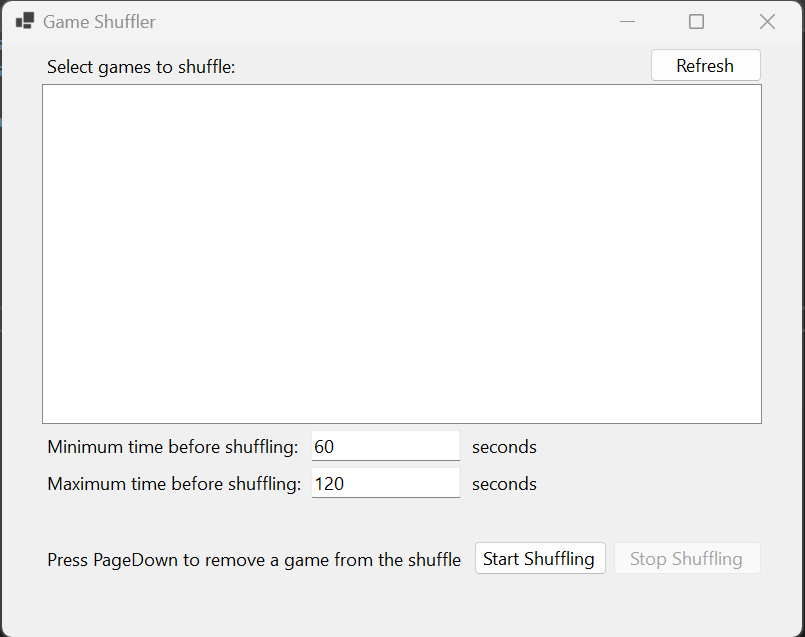
- Click Refresh to populate the list of processes available for shuffling
- Select the games you want to shuffle and change the minimum and maximum time between shuffles, if desired
- Click Start Shuffle
- All but one of the games should become minimized and unresponsive, the other should be maximized
- The active game will change randomly within the limits set
- Press PageDown at any time to remove the current game from the shuffle, and force-quit it
- Click Stop Shuffle to resume all games, and stop the shuffler
Limitations
- The shuffler isn't able to savestate and close your games, so you must be able to run all of them simultaneously. The pausing should mean that the background games are using minimal CPU, but they will still take memory.
- The way the shuffler pauses the background games may cause issues for some games. It will likely cause a disconnect for any game that requires an active internet connection.
- Switching active games occasionally loses focus. Clicking on the window will restore it. Running in windowed mode and not switching focus to other applications helps, but may not fix the issue entirely.
- Anti-cheat tools may prevent the shuffler from pausing games when they are not active.