 ecd955bc60
* [Installer] Abort instead of installing over leftover runtime files

The silent upgrade could leave a mix of old and new Qt DLLs next to the new
executables, which is what makes the next start fail with "The procedure entry
point X could not be located in the dynamic link library ...Qt6QuickWidgets.dll"
or "The code execution cannot proceed because Qt6Multimedia.dll was not found".

The check that was supposed to catch this probed only Qt6Core.dll and
Qt6Network.dll, so it was blind to the two files the reports name. It also only
warned and then installed anyway, so a caught problem was still compounded.

- Scan every file the purge targets with FindFirst, which takes the same
  wildcards the Delete/RMDir calls use, instead of two hardcoded names
- Widen IsExistingCockatriceInstall from Qt6Core.dll to Qt6*.dll so a directory
  left holding only some Qt modules is still recognised as an install
- Gate the scan on that, so a first-time install into a directory that happens to
  hold unrelated Qt5 DLLs is not turned into an abort
- Abort with a non-zero exit code instead of warning, so the new payload is
  never written next to files of the previous version
- Skip the message box on an unattended /S install, which would block on it
  forever, matching the two existing abort sites

* [Installer] Cancel a silent upgrade when the running-instance guard fails

The running instance guard is what stands between a locked install directory
and the mixed Qt DLL set that breaks the next start, but it failed open in two
places and let the install carry on anyway:

- powershell.exe could not be started: the check warned and returned
- the process lookup answered "could not determine": WaitForAppToClose returned
  on $R0 != 1, so "unknown" was treated exactly like "not running"

On a silent upgrade there is nobody at the keyboard to close the applications in
response to that warning, which is precisely the state in which the launcher was
still holding its Qt DLLs mapped.

- Treat "could not determine" as its own state rather than folding it into "not
  running", in all three places WaitForAppToClose inspects the result
- Cancel a silent upgrade in both cases; keep an interactive install on the
  existing warn-and-continue path, since refusing there would leave an installer
  that can never complete and the stale-runtime check still applies
- Route every abort through one AbortInstall so the dialog-vs-silent decision
  lives in a single place, and stop the two pre-existing warning dialogs that a
  /S install without /R would have blocked on forever

* [Installer] Wait on the process that launched the update installer

The in-app updater starts the installer and only then quits itself, so the
installer has to decide whether the launching process is still alive while it is
running. It did that by polling powershell.exe for an image name under the
install directory, which is a proxy for the real question - is the process that
started me still holding its Qt DLLs mapped - and a proxy that can answer "not
running" or "could not determine" while the process is very much alive. Either
answer let the install carry on into the mixed Qt DLL set.

Take /PID= from the command line and wait on that process handle directly:

- OpenProcess with PROCESS_SYNCHRONIZE only, which is all that is needed to wait
  and the least likely to be refused for an unrelated reason
- WaitForSingleObject for the same 60 s the name based check allows, so a client
  slow to flush its card database is not squeezed
- Treat an unopenable handle as "already exited", which is what it means for a
  dead process
- Cancel the upgrade if the launcher has not exited, rather than replacing files
  it is still using

Run it before EnsureAppsNotRunning, not after: it needs no powershell.exe, so it
is the one check that still works on a machine where the process lookup cannot
run, and it is what lets that case keep upgrading instead of being cancelled by
what was only ever a proxy for it. Keep an older client, which passes no /PID=,
on the existing path.

An older installer ignores /PID=, and /D= stays the last parameter either way.

* [Client] Pass our process id to the update installer

The updater starts the installer and only then quits itself, so the installer
begins replacing files while this process still has every Qt runtime DLL mapped,
and a mapped DLL cannot be deleted. It has to work out that it must wait, and
until now all it had was its own image name to go on.

Pass /PID= so it can wait on this process directly instead of guessing, and
cancel the update rather than replace files this process is still using. /D=
stays the last parameter, which NSIS requires.

* [CI] Fail the build when the installer is missing a Qt runtime DLL

The Windows payload is assembled by globbing every *.dll out of the build output
directories, so nothing but luck decides whether a module the client links
statically - Qt6Multimedia.dll, Qt6QuickWidgets.dll - reaches the installer at
all. A module that is left out is invisible until a user installs an update and
the client then refuses to start, with "The code execution cannot proceed because
Qt6Multimedia.dll was not found" or a missing procedure entry point in a
Qt6QuickWidgets.dll carried over from the previous version.

Derive the required list from SERVATRICE_QT_MODULES, COCKATRICE_QT_MODULES and
ORACLE_QT_MODULES, the same module lists the targets are actually built against,
so it cannot drift from what the binaries need, and write it next to the CMake
cache as required-qt-runtime.txt. Add the platform plugin, without which the
client cannot start at all.

Assert it in the existing 7-Zip pass that already rejects build-tree artifacts,
comparing exact relative paths so a same-named file in the wrong directory does
not satisfy a requirement, and normalizing the archive's own separators so it
does not matter which one NSIS chose. Missing manifest, missing entry or missing
7-Zip-independent failures all stop the build rather than warn, which is the
whole point: the previous check already failed hard for artifacts, and a warning
here is what let a broken package ship.

* [Client] Point the Windows qt.conf translations path at the real one

The Windows qt.conf carried Translations = Resources/translations, copied from
the macOS bundle block, but the Windows install has no Resources directory: the
.qm files are installed to COCKATRICE_WIN32_QM_INSTALL_DIR, which is
translations, and main.cpp looks for them at applicationDirPath() +
"/translations". Leave the macOS value alone, which is correct for it.

* [Installer] Close the /? help string so the installer compiles again

The last line of the continued MessageBox string ended in $\n\" instead of $\n".
NSIS reads \" as an escaped quote, so the string never terminated and makensis
rejected the script, which took the CPack packaging step down with it. The
Windows build failed on "Problem running NSIS command" before ever reaching the
new required-runtime check.

* [Installer] Give FindFirst the two arguments it takes

FindFirst takes the pattern and the output variable and leaves the search
handle in $0. There is no handle argument, and FindNext taking only a variable
is the giveaway: the handle has to live somewhere implicit, and it is $0.

The call passed three arguments, so makensis rejected the script and the CPack
packaging step failed with "Problem running NSIS command" before ever reaching
the required-runtime check.

This was not only a compile error. The handle variable was never populated, so
the stale-runtime check that commit 844a1a9b added could never see a match: it
probed $StaleFindHandle, which stayed empty, and the widened wildcard scan over
the purge set was a no-op. Pass the pattern, test $0, and close $0. No FindNext
is needed, because $R0 is a yes/no flag rather than a list.

Drops the now unused StaleFindHandle Var.

* [CI] Dump the NSIS compile log when packaging fails

CPack reports a failed makensis run as "Problem running NSIS command" plus a
path to NSISOutput.log, and that log exists only on the runner, so the actual
compile error never reaches the workflow output. An installer script that does
not compile is therefore undiagnosable from CI alone, which is exactly how a
three-argument FindFirst cost two build cycles here.

* [CI] Run the NSIS log dump under bash

The dump step used the default pwsh shell, where `find` resolves to Windows'
text-search find.exe rather than a file finder, so it died with "FIND:
Parameter format not correct" instead of printing anything. Pin shell: bash.

* [Installer] Test the error flag with LogicLib's ${Errors} condition

makensis rejected the script with "macro _If requires 4 parameter(s), passed
2" at the ClearErrors/OpenProcess pair. A ${If} condition cannot be a bare
$Var: LogicLib needs either a comparison or one of its flag macros, and a lone
$Errors splits into too few arguments for _If. ${Errors} is the documented flag
condition and is the same mechanism as the ${Silent} test already used here.

The dump step earned its keep - this took one run to locate rather than another
round of guessing.

* [Installer] Give FindFirst its handle back and stop blocking silent aborts

makensis: "FindFirst expects 3 parameters, got 2. Usage: FindFirst
$(user_var: handle output) $(user_var: filename output) filespec".

The previous commit was wrong about this. FindFirst does take the handle
explicitly, and FindNext finds it in $0 as a side effect of the FindFirst that
set it, which is why FindNext takes only a variable. The three-argument form the
stale-runtime check was written with was correct all along, and the two-argument
form broke it. Restored, along with Var StaleFindHandle.

That same commit inverted the interactive check in both abort paths.
`${If} $ReinstallMode = 1` with `${OrIfNot} ${Silent}` shows the message box
exactly when the install is the silent /R upgrade - the one case the comment
says must never block, since nothing will dismiss it and the installer hangs
until it is killed. Replaced with `${IfNot} ${Silent}`, so the box appears only
for an interactive install and a silent abort goes straight to SetErrorLevel.

Audited every construct added by this branch against master, which compiles:
all 9 LogicLib condition shapes have a master precedent, FindFirst is the only
FindFirst and is back to 3 arguments, Function/Section and block depth balance,
and the 12 lines with an odd number of quotes are the same pre-existing string
continuations master has.

* [CI] Strip the CR 7-Zip leaves on its paths before comparing them

The installer check reported all 14 required files missing, including
Qt6Core-era basics an 82 MB package obviously contains, so the payload was fine
and the comparison was broken. 7-Zip writes CRLF on Windows, sed 's/^Path = //p'
kept the \r on every line, and grep -qxF matches whole lines - so every entry
carried a trailing \r and nothing matched. The build-tree artifact check next to
it uses an unanchored grep -E and was unaffected, which is what made the two
checks disagree.

Reproduced locally against a 7z archive with CRLF injected: the old pipeline
matches nothing, the new one finds the present files and reports only the
genuinely absent one.

Also match case-insensitively. That is how the installed tree behaves - the
uninstaller clears both $INSTDIR\plugins and $INSTDIR\Plugins - so a
Plugins vs plugins difference in the archive is not a missing file.

* [CI] Print both sides of the installer path comparison, and strip its prefixes

The check still reported all 14 files missing after the CR fix, so the CR was
not the cause and the real difference between 7-Zip's output and the manifest
is still unknown. Inferring it again is what produced two wrong fixes in a row,
so on failure the check now prints the required list and the first 40 paths
7-Zip lists. A bare "missing" line cannot distinguish a missing file from a
misread listing, and twice it was the latter.

Also strip $INSTDIR/, $OUTDIR/, $PLUGINSDIR/ and ./ prefixes from the listed
paths. Written as separate -e expressions rather than one alternation: with |
as the sed delimiter an escaped \| is a literal pipe, so the alternation
version silently matched nothing at all.

Verified against a 7z archive fed through seven path shapes - plain, Windows
backslashes with CRLF, each prefix, lowercase plugins, and all of them combined
- each reporting only the file genuinely absent from the archive.

* [CI] Strip CR from the manifest side of the installer path check

The dump added last run settled it: 7-Zip listed 209 paths including Qt6Gui.dll,
Qt6Multimedia.dll and Plugins/platforms/qwindows.dll verbatim, as plain relative
paths with no prefix - so the archive side was already clean and the previous
fix was right to strip CR there but not sufficient.

The trailing CR was on the other side. CMake writes required-qt-runtime.txt
with the platform line ending, so on Windows $entry arrived as
"Qt6Gui.dll\r", which cannot whole-line match a clean "Qt6Gui.dll". Every
entry then read as missing while the listing held it, which is precisely what
the two sides of the dump showed.

Reproduced locally with a CRLF manifest against a 7z archive: without the strip
every entry is reported missing, with it only the genuinely absent file is.
Checked across plain paths, Windows backslashes with CRLF, $INSTDIR, $OUTDIR,
$PLUGINSDIR, ./ and / prefixes.

The literal $INSTDIR-style prefixes are written as [$] bracket expressions so
shellcheck does not read them as unexpanded variables; that clears the SC2016
that failed the format job, without a disable directive.

* [CI] Reword the bracket-expression comment so the linter stops parsing it

A comment whose first word is shellcheck is read as a directive, so
"# shellcheck does not read these as unexpanded shell variables" was parsed as
a directive named "does" and failed with SC1073 and SC1072 - which cascaded into
the SC1009 on the else clause above it. The SC2016 it was meant to document is
already gone now that the prefixes are written as [$] bracket expressions, so
the note only had to stop looking like a directive.

* [CI] Indent the diagnostic path lists without sed, and undo comment drift

SC2001 asks for parameter expansion instead of sed 's/^/  /'. Echoing
${manifest//$'\n'/$'\n  '} prepends the two spaces directly and keeps the
diagnostic block readable. Both occurrences are converted; only the one reading
from a here-string was reported, but the piped one has the same shape.

Also restore master's wording of the build-tree artifact comment. An earlier
edit inserted "in " ("not the install)" became "not in the install)"). It has no
functional effect, but it was an unintended change to a line this branch has no
reason to touch, and .ci/compile.sh now differs from master only by additions.

* [CI] Ship the Qt module runtimes the Windows package check requires

The installer check reports Qt6Concurrent.dll and Qt6ShaderTools.dll missing
from the Windows package. Both are genuinely absent, not another comparison
artifact - the manifest now matches 12 of 14 entries and the dual-list
diagnostic shows the other two are not in the archive at all.

Nothing deploys them. fixup_bundle copies only the DLLs it finds in
Cockatrice.exe's import table, and the *.dll glob only sees what was already
copied next to the executable. Qt6::Concurrent is linked but never imported,
because QtConcurrent::run and QFutureWatcher are header-only in Qt 6, so the
linker drops the import; Qt6::ShaderTools is skipped the same way. The package
has shipped without them and the client still starts, but that is luck rather
than intent, and required-qt-runtime.txt asks for both.

Install the runtime of every linked module explicitly so the installer contains
what the check demands. An unused DLL costs a few hundred kilobytes; a missing
one is what stops the client starting after an update, and stays invisible until
then.

Derive both the manifest and the install list from the imported target's TYPE,
so a statically linked Qt module - which ships no runtime at all - is skipped by
each and the two can never disagree. Scope the manifest to the client rather
than the union across server, client and Oracle: only the client is packaged on
Windows, and the other two module lists are subsets of the client's, so this
changes nothing today.

---------

Co-authored-by: Lukas Brübach <Bruebach.Lukas@bdosecurity.de>

Cockatrice | Download | Related | Community | Contribute | Build | Run
To get started with Cockatrice ⇢ view our webpage

To get support, or suggest changes to the app ⇢ file an issue (How?)
To help with development ⇢ learn how to contribute
Cockatrice
Cockatrice is an open-source, multiplatform application for playing tabletop card games over a network. The program's server design prevents users from manipulating the game for unfair advantage. The client also provides a single-player mode, which allows users to brew while offline.
This project uses C++ and the Qt libraries.
Download 
Downloads are available for stable releases and the current beta version in development.
There is no strict release schedule for either of them.
Latest stable release:


Latest beta version:


While incorporating the latest fixes and features, beta builds may not be stable or contain new bugs! Please report any findings and open new issues when testing them!
Related Repositories
- Magic-Token: File with MtG token data for use in Cockatrice
- Magic-Spoiler: Code to generate MtG spoiler data from MTGJSON for use in Cockatrice
- cockatrice.github.io: Code of the official Cockatrice webpage
- io.github.Cockatrice.cockatrice: Configuration of our Linux
flatpakpackage hosted at Flathub - Webatrice: Web client for Cockatrice servers (TypeScript / React)
Community Resources 
Join our Discord community to connect with other project contributors (#dev channel) or fellow users of the app. Come here to talk about the application, features, or just to hang out.
Important
For support regarding specific servers, please contact that server's admin/mods and use their dedicated communication channels rather than contacting the team building the software.
Contribute
Code | Documentation | Translation
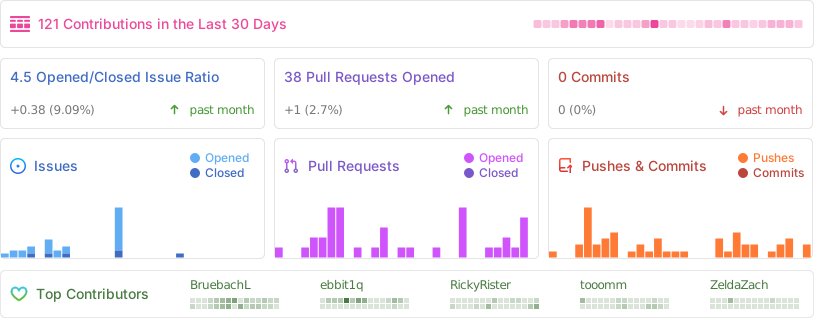
Repository Activity
Code
To contribute code to the project, please review our guidelines first.
We maintain two tags for contributors to easier find issues to potentially work on:
Issues tagged in this way provide a simple way to get started. They don't require much experience to be worked on.
This tag is used for issues that we are looking for somebody to pick up. Often this is for feature suggestions we support, but don't have the time to work on ourselves.


For both tags, we're willing to provide help to contributors in showing them where and how they can make changes, as well as code reviews for submitted changes.
We'll happily advice on how best to implement a feature, or we can show you where the codebase is doing something similar before you get too far along - put a note on an issue you want to discuss more on!
You can also have a look at our Todo List in our Code Documentation or search the repo for \todo comments.
Documentation 
There are various places where useful information for different needs are maintained:
- Official Code Documentation
- Official Wiki
Community supported - Official Webpage
- Official README
This file
Cockatrice tries to use the Google Developer Documentation Style Guide to ensure consistent documentation. We encourage you to improve the documentation by suggesting edits based on this guide.
Translation 
Cockatrice uses Transifex to manage translations. You can help us bring Cockatrice and Oracle to your language and just adjust single wordings right from within your browser by visiting our Transifex project page. The Webatrice web client manages its own translations in its repo.
Check out our Translator FAQ for more information about getting involved, and join a group of hundreds of others!
Build 

Dependencies: (for minimum versions search our CMake file)
Oracle can optionally use some packages to load compressed card files:
Basic compilation steps:
mkdir build
cd build
cmake ..
make
You can then
- Create a Cockatrice installation inside the
releasefolder:make install - Or make an installation package specific to your system:
make package
Note
Detailed compiling instructions can be found in the Cockatrice wiki at Compiling Cockatrice
The following flags (with their non-default values) can be passed to cmake:
| Flag | Description |
|---|---|
-DWITH_SERVER=1 |
Build Servatrice server |
-DWITH_CLIENT=0 |
Don't build Cockatrice client |
-DWITH_ORACLE=0 |
Don't build Oracle card database tool |
-DCMAKE_BUILD_TYPE=Debug |
Compile in debug mode Enables extra logging output, debug symbols, and much more verbose compiler warnings |
-DWARNING_AS_ERROR=0 |
Don't treat compilation warnings as errors in debug mode |
-DUPDATE_TRANSLATIONS=1 |
Configure make to update the translation .ts files for new strings in the source codeNote: make clean will remove the .ts files |
-DTEST=1 |
Enable regression tests Note: make test to run tests, googletest will be downloaded if not available |
Run
Cockatrice is the game client
Oracle fetches card data
Servatrice is the server
Docker
You can build an image & deploy a Servatrice (Cockatrice server) container using Docker and our Dockerfile yourself.
For more details, look into our wiki section on Setting up Servatrice.
You'll also find more hints on our pre-build image there, or the docker-compose file which will configure and run both a MySQL server and Servatrice.
License 
Cockatrice is free software, licensed under the GPLv2.