 bbc6003f0a
* [CrashReporting] Log which files and processes blocked the installer purge

A purge that fails aborts the upgrade with a message that can only guess
at the cause, and the log only listed which DLLs survived. Record what
Windows reports for each survivor and which processes still have the
install directory mapped, then repeat the holder list in the abort
message.

The diagnostics are additive and run only on the abort path: they open
each survivor for DELETE access and close it again without deleting, so a
failed upgrade can never end up half-removed. The purge itself is
unchanged.

* [CrashReporting] Name the holders of a failed purge with Restart Manager

The process-and-module scan could only name a holder whose image lives in the
install directory or that loaded one of its DLLs, so the case this diagnostic
exists for - an antivirus scanner holding a plain handle - was reported as "no
holder named, only a code". Reaching the Restart Manager from the NSIS script
would have meant marshalling RM_PROCESS_INFO through System::Call as a table of
hand-computed offsets, which cannot be checked without a Windows toolchain, and
that is why it was dropped when this diagnostics was written.

Move the call into tools/installer-holder-probe: a small executable the same
Windows build compiles, linking nothing from this project so it still starts
when the installed runtime is what the purge could not replace. It rides inside
the installer and is extracted to $PLUGINSDIR only when the purge has already
failed, so the successful path is unchanged and nothing new is installed.

.ci/compile.sh runs it against a file held with FileShare.None on the Windows
runners, so the lookup is exercised on real Windows instead of only compiled.

* [CrashReporting] Fix the holder probe check and cap the holder line

The probe block ran after the package steps, where the working directory is
already the build dir, so its $BUILD_DIR-prefixed paths named build/build and
the PowerShell file could not be written. Move it ahead of install/package,
where the build dir is still the cwd, and name both files relative to it.
Guard it on MAKE_NO_CLIENT, since the probe is only built with the client.

Cap the rendered holder line at HOLDER_LINE_CHAR_MAX: the count limit alone
does not keep long service names inside the NSIS string that also carries the
abort text and the log path. Whole entries are kept and the rest counted, with
the first holder always shown.

Also run cmake-format on the probe's CMakeLists so the lint job accepts it.

* [CrashReporting] Report a read-only purge survivor and bound the probe check

---------

Co-authored-by: Lukas Brübach <Bruebach.Lukas@bdosecurity.de>

Cockatrice | Download | Related | Community | Contribute | Build | Run
To get started with Cockatrice ⇢ view our webpage
To get support, or suggest changes to the app ⇢ file an issue (How?)

To learn about the app and its code ⇢ read our code documentation
To help with development ⇢ learn how to contribute
Cockatrice
Cockatrice is an open-source, multiplatform application for playing tabletop card games over a network. The program's server design prevents users from manipulating the game for unfair advantage. The client also provides a single-player mode, which allows users to brew while offline.
This project uses C++ and the Qt libraries.
Download 
Downloads are available for stable releases and the current beta version in development.
There is no strict release schedule for either of them.
Latest stable release:


Latest beta version:


While incorporating the latest fixes and features, beta builds may not be stable or contain new bugs! Please report any findings and open new issues when testing them!
Related Repositories
- Magic-Token: File with MtG token data for use in Cockatrice
- Magic-Spoiler: Code to generate MtG spoiler data from MTGJSON for use in Cockatrice
- cockatrice.github.io: Code of the official Cockatrice webpage
- io.github.Cockatrice.cockatrice: Configuration of our Linux
flatpakpackage hosted at Flathub - Webatrice: Web client for Cockatrice servers (TypeScript / React)
Community Resources 
Join our Discord community to connect with other project contributors (#dev channel) or fellow users of the app. Come here to talk about the application, features, or just to hang out.
Important
For support regarding specific servers, please contact that server's admin/mods and use their dedicated communication channels rather than contacting the team building the software.
Contribute
Code | Documentation | Translation
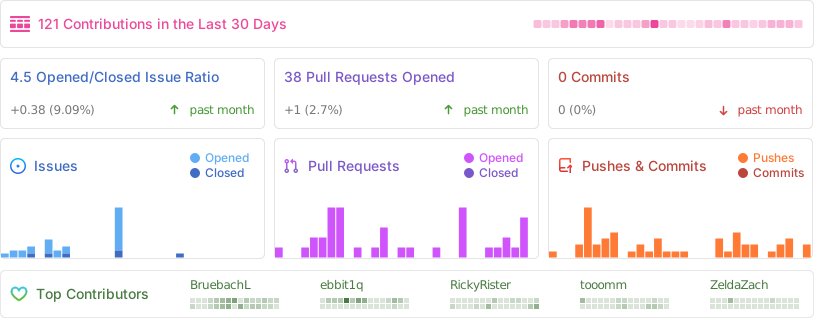
Repository Activity
Code
To commit code to the project, please review our Contribution Guidelines first.
We maintain two tags for contributors to easier find issues to potentially work on:
Issues tagged in this way provide a simple way to get started. They don't require much experience to be worked on.
This tag is used for issues that we are looking for somebody to pick up. Often this is for feature suggestions we support, but don't have the time to work on ourselves.


For both tags, we're willing to provide help to contributors in showing them where and how they can make changes, as well as code reviews for submitted changes.
We'll happily advice on how best to implement a feature, or we can show you where the codebase is doing something similar before you get too far along - put a note on an issue you want to discuss more on!
You can also have a look at our Todo List in our Code Documentation or search the repo for \todo comments.
Documentation 
There are various places where useful information for different needs are maintained:
- Official Code Documentation
- Official Wiki
Community supported - Official Webpage
- Official README
This file - Official CONTRIBUTING
Cockatrice tries to use the Google Developer Documentation Style Guide to ensure consistent documentation.
We encourage everybody to improve the documentation by suggesting edits based on this guide.
Translation 
Cockatrice uses Transifex to manage translations. You can help us bring Cockatrice and Oracle to your language and just adjust single wordings right from within your browser by visiting our Transifex project page. The Webatrice web client manages its own translations in its repo.
Check out our Translator FAQ for more information about getting involved, and join a group of hundreds of others!
Build 

Dependencies: (for minimum versions search our CMake file)
Oracle can optionally use some packages to load compressed card files:
Basic compilation steps:
mkdir build
cd build
cmake ..
make
You can then
- Create a Cockatrice installation inside the
releasefolder:make install - Or make an installation package specific to your system:
make package
Note
Detailed compiling instructions can be found in the Cockatrice wiki at Compiling Cockatrice
The following flags (with their non-default values) can be passed to cmake:
| Flag | Description |
|---|---|
-DWITH_SERVER=1 |
Build Servatrice server |
-DWITH_CLIENT=0 |
Don't build Cockatrice client |
-DWITH_ORACLE=0 |
Don't build Oracle card database tool |
-DCMAKE_BUILD_TYPE=Debug |
Compile in debug mode Enables extra logging output, debug symbols, and much more verbose compiler warnings |
-DWARNING_AS_ERROR=0 |
Don't treat compilation warnings as errors in debug mode |
-DUPDATE_TRANSLATIONS=1 |
Configure make to update the translation .ts files for new strings in the source codeNote: make clean will remove the .ts files |
-DTEST=1 |
Enable regression tests Note: make test to run tests, googletest will be downloaded if not available |
Tip
Build code documentation (Doxygen) according to our configuration into
/docs:doxygen Doxyfile
Run
Cockatrice is the game client
Oracle fetches card data
Servatrice is the server
Docker
You can build an image & deploy a Servatrice (Cockatrice server) container using Docker and our Dockerfile yourself.
For more details, look into our wiki section on Setting up Servatrice.
You'll also find more hints on our pre-build image there, or the docker-compose file which will configure and run both a MySQL server and Servatrice.
License 
Cockatrice is free software, licensed under the GPLv2.