 9f59f5c495
* [CrashReporting] Breakpad everywhere, session detection, symbol CI (inc 3)

Breakpad on all platforms (no crashpad packaging); remove the Windows
MiniDumpWithFullMemory filter and the installer WER LocalDumps full-dump
registration. QLockFile per-process session tracking replaces the
Windows-only .dmp scan, placed after parser.process and the instance
hand-off so help/version exits and handed-off secondaries never leak a
lock. CI: Release-only DSN bake from SENTRY_DSN secret, tag-only
sentry-cli symbol upload (org cockatrice, project native).

Tests: 533/533 ctest green, format clean, code gate PASS.

* [CrashReporting] Enable http_retry, harden symbol upload, fix NSIS context

Sets sentry_options_set_http_retry so the cache_keep-held crash
envelope in Ask mode is written with a retry filename and actually
flushes on giveConsent() instead of sitting in <db>/cache until
pruning.

Adds continue-on-error to both sentry-cli install steps so a Sentry
registry outage or broken Git Bash install cannot block release
assets.

Cleans the legacy WER CrashDumps folder under SetShellVarContext
current (under all it resolves to ProgramData, not the user's
AppData) in installer and uninstaller; registry delete works in
either context.

* [CrashReporting] Extract the startup crash-report flow from main() per review

* [CrashReporting] Break up the CrashReporter class doc per review

* [CrashReporting] Drop the invalid --release from the symbol upload

`debug-files upload` never accepted `--release` (checked against the pinned
sentry-cli 3.8.0: the subcommand declares --org/--project and a set of
type/id/scan options, and execute() reads no release; the only global flags are
--url/--header/--auth-token/--log-level/--quiet/--allow-failure). Clap rejects
the unknown flag before any upload happens, so every tag build has been shipping
without symbols, with continue-on-error keeping the release pipeline green.

Release association is also the wrong mechanism: debug information files are
matched to events by debug ID via the event's debug_meta. The Sentry release of
a native event comes from the event itself (COCKATRICE_SENTRY_RELEASE), not from
the DIF upload. Remove the flag and the now-unused SENTRY_RELEASE env from both
invocations (Linux, and Windows/macOS).

The symbol upload stays continue-on-error (a Sentry outage must not block the
release assets); revisit once it has proven itself on a tag.

* [CrashReporting] Split debug information out of packaged release binaries

-g is required so the CI symbol upload has DWARF to send, but it was left in
the shipped binaries too: the Linux Release client is 563 MiB, 552 MiB of it
debug info, and every distribution channel pays for that.

Keep the build tree unchanged (CI uploads symbols from build/) and strip only
the packaged copy. A CPack pre-build script extracts each ELF's debug info to
COCKATRICE_DEBUG_SYMBOL_DIR and then runs `strip --strip-debug --strip-unneeded`.
.eh_frame is allocatable and survives, so unwinding is unaffected, and the build
ID is identical in the stripped binary and the sidecar.

Measured on a local Release build (GCC -O2 -g, WITH_CRASH_REPORTING=ON),
bytes:

  binary      build tree  packaged before  packaged after  .debug sidecar
  cockatrice 590,722,560      590,722,560      28,086,480     579,623,576
  oracle      53,432,608       53,432,608       1,649,888      52,075,344
  tar.gz of both trees: 289,964,521 -> 19,018,058 (~15x smaller).

Only ELF (Linux/BSD) is handled: Windows already links /DEBUG with separate
PDBs, and macOS extracts a dSYM from the bundle. Opt-out via
COCKATRICE_SPLIT_DEBUG_SYMBOLS; skipped with a warning when objcopy/strip are
missing. CPACK_PRE_BUILD_SCRIPTS (not CPACK_INSTALL_SCRIPTS, which runs before
staging) invokes it, and the script refuses to run unless CPACK_TEMPORARY_DIRECTORY
is a real CPack staging tree so a missing variable can never turn its glob into
a filesystem-wide walk.

* [CrashReporting] Upload Windows PDBs from where Ninja actually puts them

The Windows branch of the symbol upload looked in build/<target>/Release, which
is the Visual Studio generator's layout. The Windows leg uses Ninja, which is
single-config: linker PDBs land in build/<target>/, next to the binaries — the
same paths the "[Windows] Upload PDBs" artifact step below globs with
if-no-files-found: error.

So paths was always empty on Windows, the step printed "No symbol paths found,
skipping symbol upload" and exited 0: a silent no-op behind continue-on-error.
Every Windows build would then report "A required debug information file was
missing" for cockatrice.exe with a PDB-style debug id (GUID-age), exactly as if
no upload step existed at all.

Use the artifact step's globs. Also turn the empty-path case into a failure in
both symbol steps: a silent skip is indistinguishable from a successful upload
(which is how the wrong path went unnoticed), and continue-on-error already
keeps a broken upload from failing the release.

Verified by extracting both steps' run blocks and executing the Windows branch
against a Ninja-style tree: it now passes the three linker PDBs to sentry-cli
(and not the CMakeFiles/*.pdb intermediates), and exits non-zero with an
::error:: annotation when there is nothing to upload.

* [CrashReporting] Archive PDBs on tag builds so a failed upload is recoverable

The "[Windows] Upload PDBs" artifact step skipped tag builds
(github.ref_type != 'tag'), so for a release the symbols existed only inside
the Sentry upload — which is continue-on-error. A failed upload therefore lost
the ability to symbolicate that release permanently: no rebuild produces the
same PDB, since the debug id is a per-build GUID+age. That is how every
Windows crash reported so far became unreadable.

Archive the PDBs for tag builds as well, and order the step after
"Upload to release" so a missing PDB can never block a release from being
published. Retention stays at the repository default; nothing consumes the
artifact automatically, it is the manual recovery path
(gh run download <run> -n <name>-PDBs, then sentry-cli debug-files upload).

Verified by re-parsing the workflow and asserting the step order
(release -> PDBs -> attest) and the broadened condition.

* [CrashReporting] Upload the Windows executables with their PDBs

Sentry needs two things per image on Windows: symbolication and stack
unwinding. The PDB covers symbolication, but for a 64-bit PE the Call Frame
Information (.pdata/.xdata) lives in the executable and is not copied into the
PDB, so uploading PDBs alone leaves the image at "Stack Unwinding: Missing".
That is exactly what the event's Images panel showed for cockatrice.exe, while
Sentry's own Microsoft symbol server resolved KERNELBASE.dll and ucrtbase.dll
from the same dump.

sentry-cli also needs the pair in the same invocation: only then does it
associate the PE's code identifier with the PDB's debug identifier, otherwise
"the identifiers diverge and Sentry might not be able to resolve the correct
file for symbolication" (docs: Debug Identifiers).

Do the same for macOS, where the dSYM carries the debug information but the
Mach-O carries the unwind information, and include the executables in the
symbol artifact so a re-upload still has the pair to offer.

Verified by extracting the step and running both branches against stub
harnesses: Windows passes the three exe/pdb pairs in a single sentry-cli
invocation and still fails loudly on an empty tree; macOS passes the dSYM and
the Mach-O together.

* [CrashReporting] Upload the shipped Qt runtime DLLs too

Qt ships no PDBs with its MSVC SDK, so every Qt frame in a crash report
resolved to nothing: an image with neither PDB nor PE has no unwind
information (on 64-bit Windows the Call Frame Information lives in the PE
and is not copied into the PDB) and no symbol source to fall back on.

The list is required-runtime.txt, the manifest .ci/compile.sh already
asserts the installer against, so what gets uploaded is exactly what an
install carries. Qt frames now get unwinding plus export-table names; line
numbers still need Qt's debug information files, which the SDK omits.

The guards are not cosmetic: the step runs under `bash -eo pipefail`, where
a sed over a missing file or an unmatched ls glob aborts the whole step, and
continue-on-error makes that look identical to a successful upload.

* [CrashReporting] Upload only the binaries, archive symbols only on tags

The Linux leg handed sentry-cli whole build directories: 471 candidate files,
of which 7 were object files that can never match a stack frame. Only the
three linked binaries carry the build-ids Sentry looks up; the packaged copy
is split and stripped but keeps that same build-id.

The Windows symbol archive ran on every packaging build even though only tag
builds upload to Sentry, so a PR build paid for an artifact nothing could
ever consume. Tags keep it as the durable copy for a failed upload.

---------

Co-authored-by: Lukas Brübach <Bruebach.Lukas@bdosecurity.de>

Cockatrice | Download | Related | Community | Contribute | Build | Run
To get started with Cockatrice ⇢ view our webpage

To get support, or suggest changes to the app ⇢ file an issue (How?)
To help with development ⇢ learn how to contribute
Cockatrice
Cockatrice is an open-source, multiplatform application for playing tabletop card games over a network. The program's server design prevents users from manipulating the game for unfair advantage. The client also provides a single-player mode, which allows users to brew while offline.
This project uses C++ and the Qt libraries.
Download 
Downloads are available for stable releases and the current beta version in development.
There is no strict release schedule for either of them.
Latest stable release:


Latest beta version:


While incorporating the latest fixes and features, beta builds may not be stable or contain new bugs! Please report any findings and open new issues when testing them!
Related Repositories
- Magic-Token: File with MtG token data for use in Cockatrice
- Magic-Spoiler: Code to generate MtG spoiler data from MTGJSON for use in Cockatrice
- cockatrice.github.io: Code of the official Cockatrice webpage
- io.github.Cockatrice.cockatrice: Configuration of our Linux
flatpakpackage hosted at Flathub - Webatrice: Web client for Cockatrice servers (TypeScript / React)
Community Resources 
Join our Discord community to connect with other project contributors (#dev channel) or fellow users of the app. Come here to talk about the application, features, or just to hang out.
Important
For support regarding specific servers, please contact that server's admin/mods and use their dedicated communication channels rather than contacting the team building the software.
Contribute
Code | Documentation | Translation
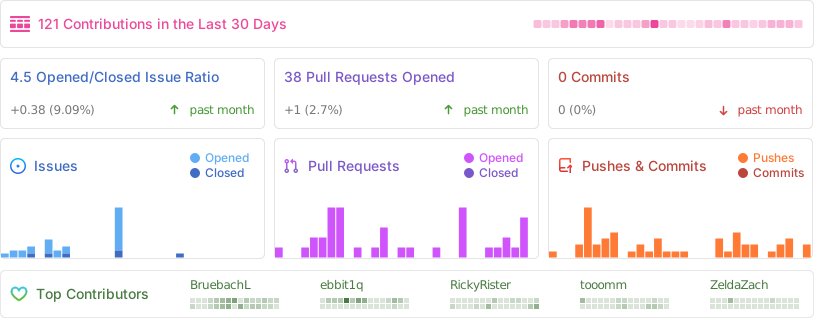
Repository Activity
Code
To contribute code to the project, please review our guidelines first.
We maintain two tags for contributors to easier find issues to potentially work on:
Issues tagged in this way provide a simple way to get started. They don't require much experience to be worked on.
This tag is used for issues that we are looking for somebody to pick up. Often this is for feature suggestions we support, but don't have the time to work on ourselves.


For both tags, we're willing to provide help to contributors in showing them where and how they can make changes, as well as code reviews for submitted changes.
We'll happily advice on how best to implement a feature, or we can show you where the codebase is doing something similar before you get too far along - put a note on an issue you want to discuss more on!
You can also have a look at our Todo List in our Code Documentation or search the repo for \todo comments.
Documentation 
There are various places where useful information for different needs are maintained:
- Official Code Documentation
- Official Wiki
Community supported - Official Webpage
- Official README
This file - Official CONTRIBUTING
Cockatrice tries to use the Google Developer Documentation Style Guide to ensure consistent documentation. We encourage you to improve the documentation by suggesting edits based on this guide.
Translation 
Cockatrice uses Transifex to manage translations. You can help us bring Cockatrice and Oracle to your language and just adjust single wordings right from within your browser by visiting our Transifex project page. The Webatrice web client manages its own translations in its repo.
Check out our Translator FAQ for more information about getting involved, and join a group of hundreds of others!
Build 

Dependencies: (for minimum versions search our CMake file)
Oracle can optionally use some packages to load compressed card files:
Basic compilation steps:
mkdir build
cd build
cmake ..
make
You can then
- Create a Cockatrice installation inside the
releasefolder:make install - Or make an installation package specific to your system:
make package
Note
Detailed compiling instructions can be found in the Cockatrice wiki at Compiling Cockatrice
The following flags (with their non-default values) can be passed to cmake:
| Flag | Description |
|---|---|
-DWITH_SERVER=1 |
Build Servatrice server |
-DWITH_CLIENT=0 |
Don't build Cockatrice client |
-DWITH_ORACLE=0 |
Don't build Oracle card database tool |
-DCMAKE_BUILD_TYPE=Debug |
Compile in debug mode Enables extra logging output, debug symbols, and much more verbose compiler warnings |
-DWARNING_AS_ERROR=0 |
Don't treat compilation warnings as errors in debug mode |
-DUPDATE_TRANSLATIONS=1 |
Configure make to update the translation .ts files for new strings in the source codeNote: make clean will remove the .ts files |
-DTEST=1 |
Enable regression tests Note: make test to run tests, googletest will be downloaded if not available |
Tip
Build code documentation (Doxygen) according to our configuration into
/docs:doxygen Doxyfile
Run
Cockatrice is the game client
Oracle fetches card data
Servatrice is the server
Docker
You can build an image & deploy a Servatrice (Cockatrice server) container using Docker and our Dockerfile yourself.
For more details, look into our wiki section on Setting up Servatrice.
You'll also find more hints on our pre-build image there, or the docker-compose file which will configure and run both a MySQL server and Servatrice.
License 
Cockatrice is free software, licensed under the GPLv2.