 05dcde69db
* [Server] Gate room channels on privilege levels

* [Server] Filter channel catalog per user, split read/write gating, add banners

- Server_Room::getInfo() now takes the requesting user and only lists
  channels that user may read. Previously every room member received the
  full catalog (e.g. the moderators channel) while message delivery was
  already gated, so restricted channels were visible but silent.
- Split channel access into mayReadChannel/mayWriteChannel: history
  replay, catalog listing, and event fan-out use the read level
  (access_level); Command_RoomChannelSay uses the write level
  (write_access_level, falling back to the read level when unset).
- Plumb write_access_level and banner_message through both room sources
  (SQL rooms_channels table and config-file channels via writeaccess
  and banner keys).
- Schema 38 -> 39: add write_access_level (NULL means inherit the read
  level) and banner_message columns; also widen access_level to the
  full six-value privilege enum to match the 37 -> 38 migration.

* Fixup: evaluate channel access per user flag instead of ladder

User flags are independent bits: IsDeveloper does not imply
IsModerator/IsAdmin, so developer-only users must not reach
moderator/admin channels. Replace the userPrivilegeLevel ladder with
hasChannelPrivilege: moderator channels need IsModerator (admins hold
it alongside IsAdmin), admin channels need IsAdmin, developer channels
need IsDeveloper or IsAdmin, judge channels admit IsJudge/IsModerator.
Covers catalog filtering, history replay, write gating and fan-out,
and corrects the ini example and proto docs.

* [Server] Make channel privilege helpers static per review

* [Server] Fail closed on unknown channel access levels per review

- roomChannelAccessFromKey returns nullopt for unknown keywords
  instead of silently falling back to Public
- skip channels with unknown read/write levels with qWarning, empty
  read defaults to Public, empty write means no override
- mayWriteChannel now also requires read access so write-below-read
  configs cannot post into invisible channels

* [Server] Remove stray conflict marker in channel replay comment

* [Server] Fix servatrice.cpp formatting per clang-format-18

---------

Co-authored-by: Lukas Brübach <Bruebach.Lukas@bdosecurity.de>
Co-authored-by: BruebachL <bruebachl@cockatrice.example>

Cockatrice | Download | Related | Community | Contribute | Build | Run
To get started with Cockatrice ⇢ view our webpage

To get support, or suggest changes to the app ⇢ file an issue (How?)
To help with development ⇢ learn how to contribute
Cockatrice
Cockatrice is an open-source, multiplatform application for playing tabletop card games over a network. The program's server design prevents users from manipulating the game for unfair advantage. The client also provides a single-player mode, which allows users to brew while offline.
This project uses C++ and the Qt libraries.
Download 
Downloads are available for stable releases and the current beta version in development.
There is no strict release schedule for either of them.
Latest stable release:


Latest beta version:


While incorporating the latest fixes and features, beta builds may not be stable or contain new bugs! Please report any findings and open new issues when testing them!
Related Repositories
- Magic-Token: File with MtG token data for use in Cockatrice
- Magic-Spoiler: Code to generate MtG spoiler data from MTGJSON for use in Cockatrice
- cockatrice.github.io: Code of the official Cockatrice webpage
- io.github.Cockatrice.cockatrice: Configuration of our Linux
flatpakpackage hosted at Flathub - Webatrice: Web client for Cockatrice servers (TypeScript / React)
Community Resources 
Join our Discord community to connect with other project contributors (#dev channel) or fellow users of the app. Come here to talk about the application, features, or just to hang out.
Important
For support regarding specific servers, please contact that server's admin/mods and use their dedicated communication channels rather than contacting the team building the software.
Contribute
Code | Documentation | Translation
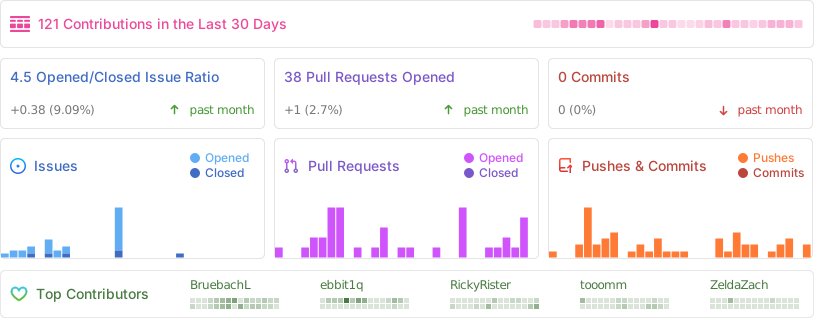
Repository Activity
Code
To contribute code to the project, please review our guidelines first.
We maintain two tags for contributors to easier find issues to potentially work on:
Issues tagged in this way provide a simple way to get started. They don't require much experience to be worked on.
This tag is used for issues that we are looking for somebody to pick up. Often this is for feature suggestions we support, but don't have the time to work on ourselves.


For both tags, we're willing to provide help to contributors in showing them where and how they can make changes, as well as code reviews for submitted changes.
We'll happily advice on how best to implement a feature, or we can show you where the codebase is doing something similar before you get too far along - put a note on an issue you want to discuss more on!
You can also have a look at our Todo List in our Code Documentation or search the repo for \todo comments.
Documentation 
There are various places where useful information for different needs are maintained:
- Official Code Documentation
- Official Wiki
Community supported - Official Webpage
- Official README
This file - Official CONTRIBUTING
Cockatrice tries to use the Google Developer Documentation Style Guide to ensure consistent documentation. We encourage you to improve the documentation by suggesting edits based on this guide.
Translation 
Cockatrice uses Transifex to manage translations. You can help us bring Cockatrice and Oracle to your language and just adjust single wordings right from within your browser by visiting our Transifex project page. The Webatrice web client manages its own translations in its repo.
Check out our Translator FAQ for more information about getting involved, and join a group of hundreds of others!
Build 

Dependencies: (for minimum versions search our CMake file)
Oracle can optionally use some packages to load compressed card files:
Basic compilation steps:
mkdir build
cd build
cmake ..
make
You can then
- Create a Cockatrice installation inside the
releasefolder:make install - Or make an installation package specific to your system:
make package
Note
Detailed compiling instructions can be found in the Cockatrice wiki at Compiling Cockatrice
The following flags (with their non-default values) can be passed to cmake:
| Flag | Description |
|---|---|
-DWITH_SERVER=1 |
Build Servatrice server |
-DWITH_CLIENT=0 |
Don't build Cockatrice client |
-DWITH_ORACLE=0 |
Don't build Oracle card database tool |
-DCMAKE_BUILD_TYPE=Debug |
Compile in debug mode Enables extra logging output, debug symbols, and much more verbose compiler warnings |
-DWARNING_AS_ERROR=0 |
Don't treat compilation warnings as errors in debug mode |
-DUPDATE_TRANSLATIONS=1 |
Configure make to update the translation .ts files for new strings in the source codeNote: make clean will remove the .ts files |
-DTEST=1 |
Enable regression tests Note: make test to run tests, googletest will be downloaded if not available |
Tip
Build code documentation (Doxygen) according to our configuration into
/docs:doxygen Doxyfile
Run
Cockatrice is the game client
Oracle fetches card data
Servatrice is the server
Docker
You can build an image & deploy a Servatrice (Cockatrice server) container using Docker and our Dockerfile yourself.
For more details, look into our wiki section on Setting up Servatrice.
You'll also find more hints on our pre-build image there, or the docker-compose file which will configure and run both a MySQL server and Servatrice.
License 
Cockatrice is free software, licensed under the GPLv2.