mirror of
https://github.com/afska/gba-link-connection.git
synced 2026-10-02 05:47:11 -05:00

gba-link-connection
A GameBoy Advance Link Cable library to add multiplayer support to homebrew games.
The library uses message queues to send/receive data and transmits when it's possible. As it uses CPU interrupts, the connection is alive even if a console drops a frame or gets stucked in a long iteration loop. After such event, all nodes end up receiving all the pending messages, so a lockstep communication protocol can be used.

Usage
All the complexity is abstracted in a single header file that exposes an easy-to-use interface.
- Include LinkConnection.h in your game code, and read its comment with instructions.
- Check out the examples folder
- Builds are available in Releases.
- They can be tested on real GBAs or with emulators (NO$GBA, mGBA, or VBA-M).
Constructor options
new LinkConnection(...) accepts these optional parameters:
| Name | Type | Default | Description |
|---|---|---|---|
startNow |
bool | true |
Automatically starts serial communication. Otherwise, you'll need to call linkConnection->activate(). |
baudRate |
BaudRate | BaudRate::BAUD_RATE_3 |
Sets a specific baud rate. |
timeout |
u32 | 3 |
Number of frames without an II_SERIAL IRQ to reset the connection. |
bufferSize |
u32 | 60 |
Number of messages that the queues will be able to store. |
Makefile actions
make cleanmake buildmake startmake rebuildmake restart
Documentation
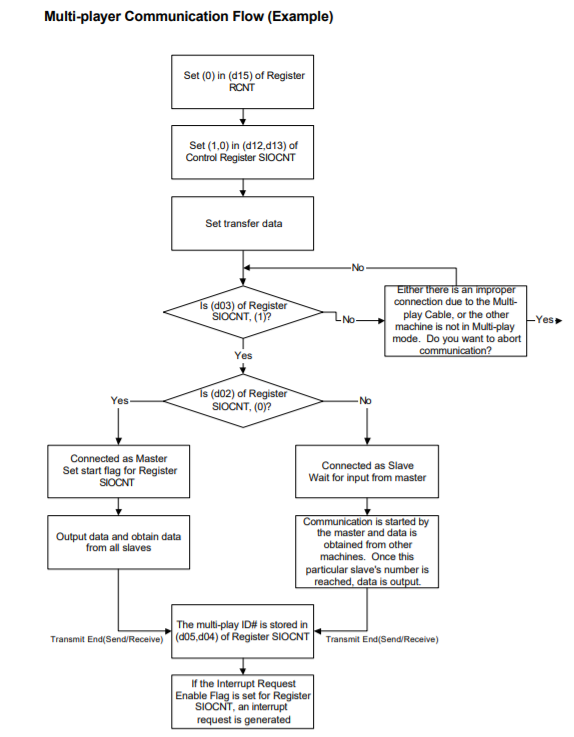
Multi-Player mode can be used to communicate between up to 4 units.

> 4000134h - RCNT (R) - Mode Selection, in Normal/Multiplayer/UART modes (R/W)
  Bit   Expl.
  0-3   Undocumented (current SC,SD,SI,SO state, as for General Purpose mode)
  4-8   Not used     (Should be 0, bits are read/write-able though)
  9-13  Not used     (Always 0, read only)
  14    Not used     (Should be 0, bit is read/write-able though)
  15    Must be zero (0) for Normal/Multiplayer/UART modes
Note: Even though undocumented, many Nintendo games are using Bit 0 to test current SC state in multiplay mode.

> 4000128h - SIOCNT - SIO Control, usage in MULTI-PLAYER Mode (R/W)
  Bit   Expl.
  0-1   Baud Rate     (0-3: 9600,38400,57600,115200 bps)
  2     SI-Terminal   (0=Parent, 1=Child)                  (Read Only)
  3     SD-Terminal   (0=Bad connection, 1=All GBAs Ready) (Read Only)
  4-5   Multi-Player ID     (0=Parent, 1-3=1st-3rd child)  (Read Only)
  6     Multi-Player Error  (0=Normal, 1=Error)            (Read Only)
  7     Start/Busy Bit      (0=Inactive, 1=Start/Busy) (Read Only for Slaves)
  8-11  Not used            (R/W, should be 0)
  12    Must be "0" for Multi-Player mode
  13    Must be "1" for Multi-Player mode
  14    IRQ Enable          (0=Disable, 1=Want IRQ upon completion)
  15    Not used            (Read only, always 0)
The ID Bits are undefined until the first transfer has completed.

> 400012Ah - SIOMLT_SEND - Data Send Register (R/W)
Outgoing data (16 bit) which is to be sent to the other GBAs.

> 4000120h - SIOMULTI0 - SIO Multi-Player Data 0 (Parent) (R/W)
> 4000122h - SIOMULTI1 - SIO Multi-Player Data 1 (1st child) (R/W)
> 4000124h - SIOMULTI2 - SIO Multi-Player Data 2 (2nd child) (R/W)
> 4000126h - SIOMULTI3 - SIO Multi-Player Data 3 (3rd child) (R/W)
These registers are automatically reset to FFFFh upon transfer start.
After transfer, these registers contain incoming data (16bit each) from all remote GBAs (if any / otherwise still FFFFh), as well as the local outgoing SIOMLT_SEND data.
Ie. after the transfer, all connected GBAs will contain the same values in their SIOMULTI0-3 registers.

> Initialization
- Initialize RCNT Bit 14-15 and SIOCNT Bit 12-13 to select Multi-Player mode.
- Read SIOCNT Bit 3 to verify that all GBAs are in Multi-Player mode.
- Read SIOCNT Bit 2 to detect whether this is the Parent/Master unit.

> Recommended Transmission Procedure
- Write outgoing data to SIODATA_SEND.
- Master must set Start bit.
- All units must process received data in SIOMULTI0-3 when transfer completed.
- After the first successful transfer, ID Bits in SIOCNT are valid.
- If more data is to be transferred, repeat procedure.
The parent unit blindly sends data regardless of whether childs have already processed old data/supplied new data. So, parent unit might be required to insert delays between each transfer, and/or perform error checking.
Also, slave units may signalize that they are not ready by temporarily switching into another communication mode (which does not output SD High, as Multi-Player mode does during inactivity).

> Transfer Protocol
>> Beginning
- The masters SI pin is always LOW.
- When all GBAs are in Multiplayer mode (ready) SD is HIGH.
- When master starts the transfer, it sets SC=LOW, slaves receive Busy bit.
>> Step A
- ID Bits in master unit are set to 0.
- Master outputs Startbit (LOW), 16bit Data, Stopbit (HIGH) through SD.
- This data is written to SIOMULTI0 of all GBAs (including master).
- Master forwards LOW from its SO to 1st childs SI.
- Transfer ends if next child does not output data after certain time.
>> Step B
- ID Bits in 1st child unit are set to 1.
- 1st Child outputs Startbit (LOW), 16bit Data, Stopbit (HIGH) through SD.
- This data is written to SIOMULTI1 of all GBAs (including 1st child).
- 1st child forwards LOW from its SO to 2nd childs SI.
- Transfer ends if next child does not output data after certain time.
>> Step C
- ID Bits in 2nd child unit are set to 2.
- 2nd Child outputs Startbit (LOW), 16bit Data, Stopbit (HIGH) through SD.
- This data is written to SIOMULTI2 of all GBAs (including 2nd child).
- 2nd child forwards LOW from its SO to 3rd childs SI.
- Transfer ends if next child does not output data after certain time.
>> Step D
- ID Bits in 3rd child unit are set to 3.
- 3rd Child outputs Startbit (LOW), 16bit Data, Stopbit (HIGH) through SD.
- This data is written to SIOMULTI3 of all GBAs (including 3rd child).
- Transfer ends (this was the last child).
>> Transfer end
- Master sets SC=HIGH, all GBAs set SO=HIGH.
- The Start/Busy bits of all GBAs are automatically cleared.
- Interrupts are requested in all GBAs (as far as enabled).

> Error Bit
This bit is set when a slave did not receive SI=LOW even though SC=LOW signalized a transfer (this might happen when connecting more than 4 GBAs, or when the previous child is not connected). Also, the bit is set when a Stopbit wasn't HIGH.
The error bit may be undefined during active transfer - read only after transfer completion (the transfer continues and completes as normal even if errors have occurred for some or all GBAs).
Don't know: The bit is automatically reset/initialized with each transfer, or must be manually reset?

> Transmission Time
The transmission time depends on the selected Baud rate. And on the amount of Bits (16 data bits plus start/stop bits for each GBA), delays between data for each GBA, plus final timeout (if less than 4 GBAs). That is, depending on the number of connected GBAs:
  GBAs    Bits    Delays   Timeout
  1       18      None     Yes
  2       36      1        Yes
  3       54      2        Yes
  4       72      3        None
(The average Delay and Timeout periods are unknown?)
Above is not counting the additional CPU time that must be spent on initiating and processing each transfer.

> Fast One-Way Transmission
Beside for the actual SIO Multiplayer mode, you can also use SIO Normal mode for fast one-way data transfer from Master unit to all Child unit(s). See chapter about SIO Normal mode for details.